Upgrade trace-level evaluators
- HobbyAvailable
- CoreAvailable
- ProAvailable
- EnterpriseAvailable
- Self HostedNot Available
Trace-level evaluators use Langfuse's legacy trace-centric data model and are being deprecated as part of Langfuse Fast Preview (v4). Existing evaluators continue to run while you upgrade. Fast Preview is currently available on Langfuse Cloud; for self-hosted support updates, follow the GitHub Discussion.
Observation-level evaluators run in real time and scale with larger traces and higher evaluation volume. Any future multi-span support will also use the observation-centric data model, so upgrading is the foundation for future evaluation capabilities.
Setting up a new evaluator? Start with an observation-level evaluator in the LLM-as-a-Judge setup guide. This page is only for upgrading existing trace-level evaluators.
Upgrade your evaluator
Before you start
First, upgrade your SDK or ingestion path. Observation-level evaluators run in real time with:
- Python SDK: v4.7.0+ (upgrade guide)
- JS/TS SDK: v5.4.0+ (upgrade guide)
- Direct OpenTelemetry ingestion:
x-langfuse-ingestion-version: 4(setup guide)
In the v4 data model, a trace is the logical group of observations that share a trace ID, rather than a separate record. Input and output belong to observations. In most cases, an existing root or workflow observation already carries the same input and output that was previously written to the trace. The evaluator upgrade targets that observation. If no single observation contains all required values, the coding assistant helps update your instrumentation.
Keep legacy evaluators running during the transition. After the SDK upgrade, trace input and output are no longer written automatically. If your existing trace-level evaluators read trace input or output, keep supplying these values with the deprecated set_current_trace_io() (Python) / setActiveTraceIO() (JS/TS) methods until the new observation-level evaluators are validated, then remove the calls. See Why are the input and output of a trace empty? for details.
Upgrade in Langfuse
Click on the Evaluation navigation item. The upgrade screen shows the recommended path for your project:
- In-app upgrade: Recommended when only minimal configuration changes need to be reviewed and accepted. The Langfuse Assistant guides you through these changes in the app.
- Coding assistant: Recommended when the upgrade requires broader configuration or instrumentation changes. The UI provides the skill and project context to use in your coding editor.
In both paths, the agentic flow makes the upgrade conversational: you can inspect the proposed changes, ask questions, and refine them before creating the new evaluators. You do not need to translate or recreate configurations manually.
Review, create, and validate
The recommended agent guides you through reviewing the proposed changes, creating the observation-level evaluators, and validating the result against your project data. You can ask questions and refine the target observation, filters, variable mappings, and expected score behavior until the upgrade looks correct.
When ready, create the observation-level evaluators. You can keep the legacy evaluators active temporarily to compare results, or deactivate them immediately. Confirm that the new evaluators receive the expected input, output, and context and produce the intended number of scores.
If you need to revert, deactivate the new evaluators and reactivate the existing legacy evaluators. Historical evaluation results remain accessible.
The agent explains the relevant changes during the upgrade. The following sections summarize what may differ if you want to understand the underlying behavior.
How configurations may change
Depending on the existing evaluator, the proposed configuration may target the same observation as before, replace trace fields with values from one observation, or require an instrumentation change so all required values are available together. The technical reference below explains the cases in detail.
How resulting scores may differ
Score placement and cardinality may change:
- A trace-level evaluator produces one score per matching trace.
- An observation-level evaluator produces one score per matching observation.
- If three observations in one trace match the filters, the upgraded evaluator produces three scores. To keep one score per trace, narrow the filters to one observation using its name, type, or the Is Root Observation filter.
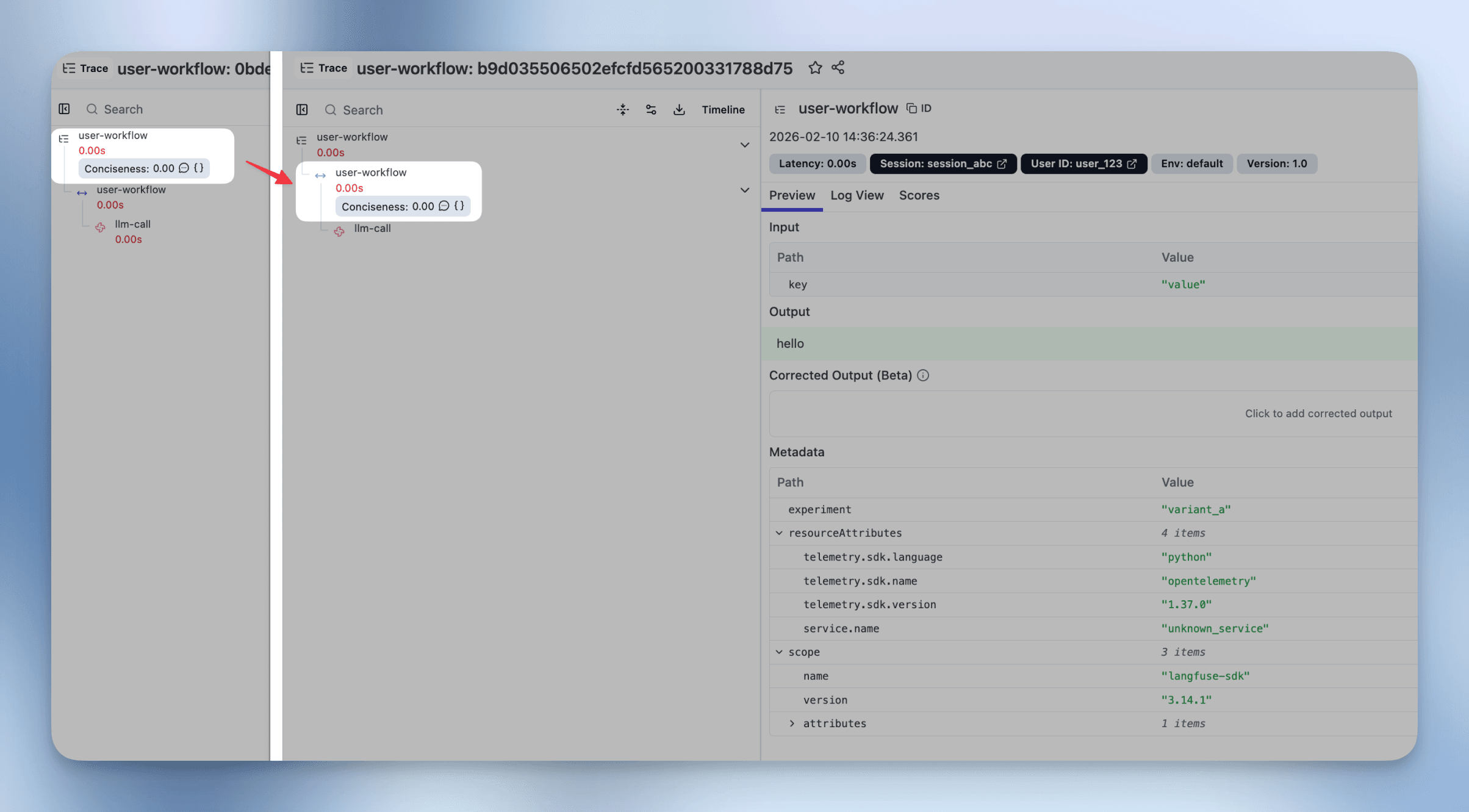
Technical reference
The recommended assistant guides you through every change. You do not need to classify or update configurations manually. Expand this section only if you want to understand how an existing configuration may be translated.
View technical configuration cases and a before/after example
Existing evaluator configurations typically fall into these cases:
| Current variable mapping | Typical configuration change |
|---|---|
Observation for every variable, all from one observation | Target the same span or generation and translate the filters and variable mappings. |
Trace for every variable | Select the observation holding the equivalent input, output, and metadata. For end-to-end evaluations, this is often a root observation. |
A mix of Trace and one Observation | Target that observation and make the trace fields available there via propagate_attributes() or an instrumentation update. |
More than one Observation, with or without Trace | Write the required values to a root or dedicated evaluation observation, then target it directly. Any future multi-span support will also use the observation-centric model. |
Before and after example
This example upgrades a trace-level evaluator that reads trace input and output to target the span containing the same values.
Before: trace-level evaluator
Target: Trace
Filters:
  environment not in ["sdk-experiment"]
  name = "user-workflow"
Variable mapping:
  query = trace.input.key
  generation = trace.output
After: observation-level evaluator
Target: Observation
Filters:
  environment not in ["sdk-experiment"]
  traceName = "user-workflow"
  type = "SPAN"
Variable mapping:
  query = observation.input.key
  generation = observation.output
Upgrade checklist
- Upgrade the SDK or OpenTelemetry ingestion path.
- Open the evaluator upgrade screen by clicking on the Evaluation navigation item.
- Follow the recommended Langfuse Assistant or coding assistant path.
- Review the newly created observation-level evaluators. Confirm the expected number and placement of scores.
- Decide whether to keep the legacy evaluator active for comparison.
- Validate the evaluator results and deactivate the legacy evaluator when ready.
Getting help
- Troubleshooting: Why is my observation-level evaluator not executing?
- Documentation: LLM-as-a-Judge step-by-step set up guide
- Questions on Fast Preview: Ask in the dedicated GitHub Discussion
- GitHub: Report issues at github.com/langfuse/langfuse
- Support: Contact support@langfuse.com for enterprise customers
Last edited


